> For the complete documentation index, see [llms.txt](https://docs.logilica.com/llms.txt). Markdown versions of documentation pages are available by appending `.md` to page URLs; this page is available as [Markdown](https://docs.logilica.com/advanced/platform-mcp-server.md).
# Platform MCP Server
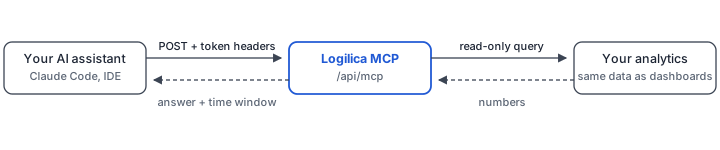
Ask questions about your engineering data in plain English, straight from an AI assistant. The Platform MCP server gives your assistant read-only access to your Logilica analytics: it finds the right metric, runs the query, and answers with real numbers from your data.
It is hosted as part of your Logilica platform, so there is nothing to install. Create an API token, point your client at it, and start asking.
Your assistant asks; Logilica answers from your own analytics
## What you can ask
Questions map to the same metrics your dashboards use. Some examples:
| Category | Example questions |
| --------- | ---------------------------------------------------------------------------------------------------- |
| Delivery | "How many pull requests did we merge last quarter?", "Which repository has the most open PRs?" |
| Speed | "What is our average PR cycle time this year?", "How long does a PR take to get its first review?" |
| CI health | "What is our build failure rate this month?", "Which builds fail most often?" |
| Trends | "Give me a weekly engineering summary", "How does this month's commit volume compare to last month?" |
| Security | "How many open vulnerabilities do we have?" |
## Before you start
You need a Logilica API token. Any role can use the MCP server with one, from **Viewer** upwards, but only an **Organisation Administrator** can create tokens. See [API Token Management](/advanced/api-tokens.md) to create one, or ask your administrator for a token.
## Connect your MCP client
The connection details are the same for every client:
| | |
| --------- | ------------------------------------------------------------------------------ |
| Endpoint | `https://logilica.io/api/mcp` |
| Transport | Streamable HTTP |
| Auth | Two headers: `X-lgca-token` (your API token) and `X-lgca-domain` (your domain) |
**Claude Desktop (and other JSON-configured clients)**
Use the configuration below. For Claude Desktop, open **Settings → Developer → Edit Config** and add it there. The connection uses the [`mcp-remote`](https://www.npmjs.com/package/mcp-remote) package.
```json
{
"mcpServers": {
"logilica": {
"command": "npx",
"args": [
"mcp-remote",
"https://logilica.io/api/mcp",
"--header",
"X-lgca-token:${LGCA_TOKEN}",
"--header",
"X-lgca-domain:${LGCA_DOMAIN}"
],
"env": {
"LGCA_TOKEN": "your-api-token",
"LGCA_DOMAIN": "your-domain"
}
}
}
}
```
Restart Claude Desktop, and Logilica appears in its tool list. Keep the credentials in `env` and the headers without a space after the colon - some clients mangle spaces inside arguments.
{% hint style="info" %}
`mcp-remote` runs through `npx`, so it needs Node.js 20.18 or newer installed.
{% endhint %}
**Claude Code (CLI)**
Claude Code sends headers directly, so it needs no bridge:
```bash
claude mcp add --transport http logilica https://logilica.io/api/mcp \
--header "X-lgca-token: " \
--header "X-lgca-domain: "
```
Run `/mcp` to confirm `logilica` shows as Connected. If the client offers to "authenticate", skip it: this server uses header authentication, not OAuth.
## Try it
Ask your assistant a question in plain English:
```
How many pull requests did we merge in the last 30 days?
```
It picks the metric, queries your data, and answers with the numbers and the exact window they cover - no dashboard needed.
## Good to know
* Results always state the time window they cover. Ask about a period and leave the dates open, and the last 30 days is used; ask with no time frame at all and the answer covers all your data - so say "this month" or "last quarter" when you mean it.
* Large results are capped and flagged as partial, so answers stay focused. Ask for aggregates rather than raw listings.
* If a metric does not exist for your domain, the assistant is told so directly, rather than being given room to guess.
## Troubleshooting
| Symptom | Cause | Fix |
| ---------------------------------------------------------------- | ----------------------------------------------------- | ----------------------------------------------------------- |
| `Missing X-lgca-token / X-lgca-domain headers` | Headers not sent | Check the header configuration in your client |
| `Invalid or expired combination of X-lgca-token + X-lgca-domain` | Wrong token type, or the token expired or was revoked | Create a fresh API token, or ask your administrator for one |
| Answers come back as zero | The question's time window has no data | Widen or shift the date range in your question |