> For the complete documentation index, see [llms.txt](https://docs.logilica.com/llms.txt). Markdown versions of documentation pages are available by appending `.md` to page URLs; this page is available as [Markdown](https://docs.logilica.com/metrics-and-reports/introduction/navigation.md).
# Navigation
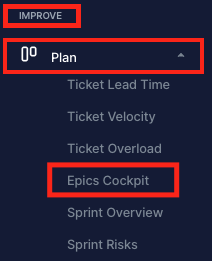
The left-hand navigation pane is used to access most of Logilica's insights and reports. The navigation is structured around key concepts:
* **Sections** are groupings of similar areas, such as insights on your delivery or insight across your teams' activities. Sections can folded/unfolded to focus on what is important at the time.
* **Work Streams** are a collection of dashboards. For instance, insights and reports around, e.g., planning activities or coding activities.
* **Dashboards** contain the actual insights in the form of charts and tables, as well as other informational content.
Improve section, with the Plan work stream and Epics Cockpit dashboard
Logilica comes pre-configures out-of-the-box and populates all dashboards once the corresponding connectors have been established.
Enterprise customers can fully customise all aspects, including layouts, charts and metrics. For more information, contact .